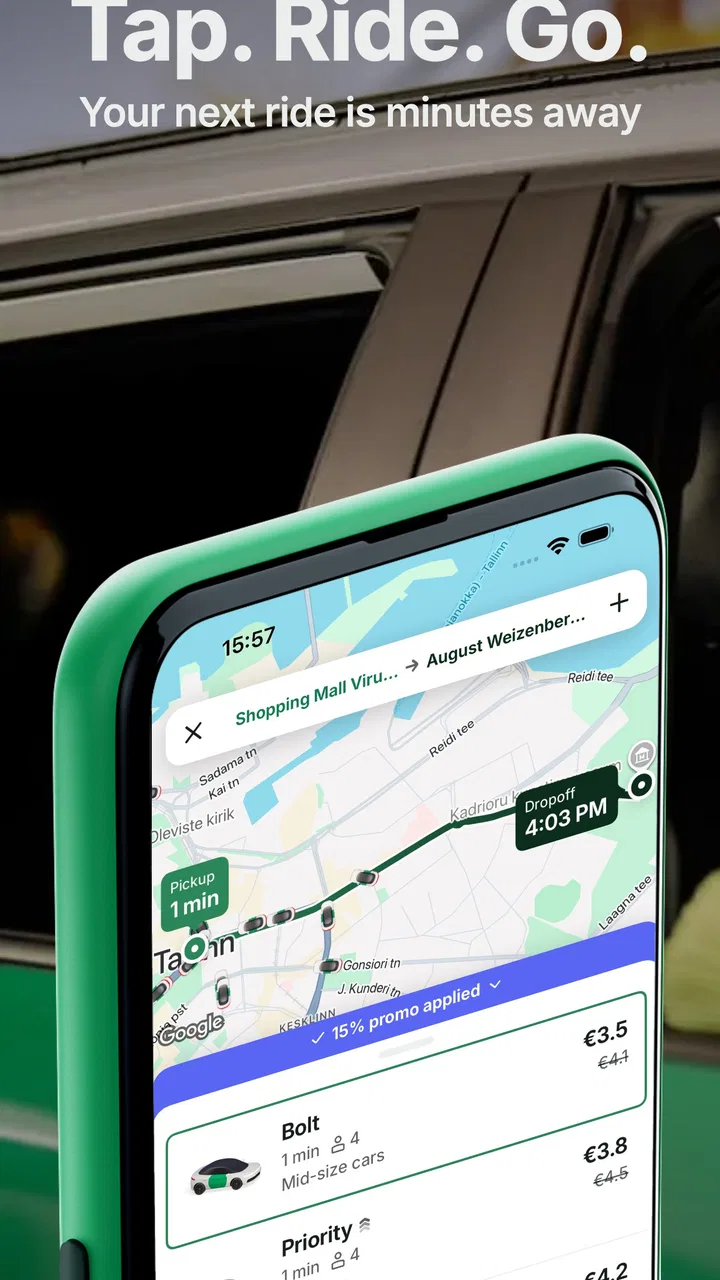
Bolt: Request a Ride
- 4.8
- Rating
- 100.00M
- Installs
- Free
- Price

 Analysis by App-foxy
When I need a car without making a phone call or standing on a street hoping a taxi passes, I turn to Bolt: Request a Ride. Its central idea is simple: request transport from a map, see the journey take shape in the app, and use the same place to manage the ride. That sounds ordinary now, but the real benefit is how much uncertainty it removes from a short trip.
Bolt is a free Maps & Navigation app from Bolt Technology, and it is available for everyone. It has been around since July 19, 2013, and its reach is substantial, with over 100 million installs and an average rating of 4.8 from around 9.7 million ratings. Those numbers do not replace personal experience, but they do show that this is a mature service rather than a little-known experiment.
I see it as most useful when I already know where I want to go but do not want to deal with the usual friction of urban transport. The strongest part is not merely finding a car. It is the door-to-door request workflow: entering a destination, checking the proposed trip, and keeping the ride organized from one screen. That convenience is also where its limitations become visible, because the quality of the experience depends on local availability and on how accurately the pickup point is understood.
In-Depth Coverage of Bolt: Request a Ride
Why requesting a ride from the map matters
The app’s main capability is ride-hailing: it connects a passenger with transport after the passenger enters a pickup location and destination. In practice, this changes the decision from “How will I get there?” to “Is requesting a car sensible for this particular trip?” I find that distinction valuable when I am carrying luggage, traveling at an awkward time, or going somewhere that would require several changes on public transport.
The map-based approach is especially helpful in places where street names are confusing or where a building has more than one entrance. Instead of explaining my location aloud, I can check the pickup point visually before confirming. That small step can prevent the common problem of waiting on the wrong side of a busy road. I still need to pay attention, but the map gives me a clearer starting point than a hurried phone conversation.
A useful habit is to treat the pickup marker as a decision point, not as a formality. If I am outside a shopping center, station, hotel, or apartment complex, I look for the most accessible entrance and adjust the location when necessary. This is one of the less obvious ways to get more from the app: accurate pickup placement often matters as much as the destination itself.
The service is free to download and use as an app, although the ride itself is a transport purchase rather than a free journey. I would check the trip details shown before requesting, especially when my schedule is tight. A ride-hailing app can make transport easier, but it does not remove traffic, demand, or the possibility that a pickup takes longer than expected.
From destination search to a practical pickup
My usual workflow starts with the destination rather than with a vague request for “a car.” Once I know the address or place, I review where the pickup marker sits and whether the suggested route makes sense. This helps me catch mistakes before a driver is committed to a difficult location. For a large venue, I prefer to wait at a recognizable entrance instead of assuming the app’s first map position is ideal.
I also use the destination field as a way to think through the last part of the journey. A map pin may land at a main entrance while I actually need a side entrance, a hotel lobby, or a terminal access road. When the destination is important, I add enough location context in the app for the trip to end somewhere practical. This is more reliable than focusing only on the name of a building.
Once the request is made, the app becomes a coordination tool. I keep it open while waiting, watch for changes in the ride status, and avoid wandering away from the pickup point. If I am in a noisy area, I check the screen rather than relying on hearing a vehicle arrive. That is a small but realistic advantage over street-hailing, where the passenger may miss the car entirely.
For a first-time user, the important question is not whether the interface is complicated. It is whether the user is prepared to make a precise pickup choice and remain reachable while the ride is being arranged. The basic request is approachable, but careless location selection can create avoidable delays. I would not request from the middle of a crowd and then walk several minutes elsewhere unless I had made that plan clear.
A realistic evening trip
Imagine leaving a restaurant after public transport has become inconvenient, with a small bag and a route that includes a long walk. I would open Bolt, set the restaurant or a nearby safe entrance as the pickup point, enter home as the destination, and inspect the proposed journey before confirming. While waiting, I would stay where the driver can reasonably reach me rather than moving between side streets.
This scenario shows the app’s real strength: it combines planning and coordination in one place. I do not need to search for a taxi rank, guess whether a car is available, or explain the destination from scratch. The trade-off is that I still need to use judgment. A crowded nightlife street, a blocked entrance, or a poor map pin can make a seemingly simple request less smooth.
You May Also Like

 AccuWeather: Weather Radar
AccuWeather Review: A Quick, Clear Forecast for Everyday Decisions
For everyday plans, the best forecast is the one you can understand quickly. AccuWeather makes rain timing, radar, and local conditions easy to act on, with a few trade-offs.

 Hill Climb Racing
Why Hill Climb Racing Still Turns Crashes Into One More Run
A tiny car, a bumpy hill and one more upgrade: Hill Climb Racing keeps resurfacing because its simple chaos makes every near-miss feel personal.

 AliExpress - Shopping App
AliExpress Makes Global Shopping Feel Personal, but Shoppers Bear the Risk
AliExpress turns a global marketplace into a pocket-sized discovery engine. Its reach is useful, its shopping loop compelling, and its trade-offs easy to miss.

 Lords Mobile: Kingdom Wars
Lords Mobile Is a Kingdom-Building Routine, Not a Quick Match
A case-by-case verdict on the building, battles, device demands, and social commitments that make Lords Mobile rewarding for some players and exhausting for others.

 PDF Scanner app - TapScanner
TapScanner Makes Paperwork Easier to Capture, Check, and Share
TapScanner makes scanning with a phone feel less like a rescue operation and more like a dependable step in getting work done. Its capture tools are useful, though not flawless.

 Block Blast!
Block Blast! Shows How Much a Puzzle Game Can Leave Out
A quiet grid game shows why puzzle players increasingly value instant clarity, repeatable skill and low-pressure play—and where the genre still needs to catch up.
More From Our News Desk
View All News


For airport or station trips, I would be even more deliberate. I would allow extra time, choose the correct terminal or entrance, and avoid treating the estimated journey as a guarantee. Ride-hailing is convenient for carrying bags, but a delayed pickup or slow traffic can affect a tight departure schedule. In that situation, a fixed public transport connection may be the wiser choice if it is dependable and easy to reach.
Where it differs from taxis and public transport
Compared with a street taxi, Bolt gives me more control before the vehicle arrives. I can enter the destination digitally and organize the pickup on a map instead of explaining everything verbally. That is useful when language, noise, or unfamiliar streets make a spoken request awkward. A taxi rank can still be better at a major transport hub, where cars are already waiting and the next available vehicle is obvious.
Compared with buses and trains, the app is more direct. I am paying for convenience rather than sharing a fixed route or accepting transfers. That makes it attractive when I am late, traveling with luggage, or going somewhere poorly served by transit. Public transport remains the better option for predictable commuting, high-demand periods, and journeys where cost matters more than door-to-door service.
Compared with walking, the choice is less about speed alone and more about effort and conditions. A short ride may not be worthwhile if walking is safe and straightforward. I use the app when weather, luggage, distance, or time makes walking unattractive. This keeps the service in its proper place: a practical transport option, not an automatic replacement for every short journey.
The app’s strong rating and broad adoption make it easy to consider a default choice, but I would not assume that popularity means identical service everywhere. Local driver availability and traffic shape the experience. In a busy city center, the app may be most useful when I choose a clear pickup point away from a blocked curb. In a quieter area, the main question may simply be whether a suitable ride can be arranged at the moment I need it.
The friction I notice before and during a ride
The first limitation is location accuracy in the real world. Map data can place a pin near a building without explaining which driveway, entrance, or street side is usable. I have learned to check landmarks and curb access rather than trusting a pin automatically. This is particularly important around campuses, malls, hospitals, and large residential developments.
The second limitation is timing. Requesting a ride is faster than searching for one manually, but it cannot guarantee an immediate pickup. Traffic, local demand, and the distance of available drivers all influence the wait. If I have an appointment that cannot be missed, I use a backup plan instead of assuming that a convenient request will always turn into a quick departure.
The third is that app convenience can encourage rushed decisions. Because the request takes only a few moments, it is tempting to confirm before checking the destination spelling or pickup position. I recommend pausing for a final review. A few seconds spent checking the map can save a much longer correction later.
There is also a social side to the experience. I need to be ready when the car arrives, especially in a busy area where stopping is difficult. Standing in a visible, sensible location helps both passenger and driver. The app can coordinate the ride, but it cannot make an inaccessible curb accessible or turn a crowded road into a quiet pickup zone.
Practical habits that make the service better
I have found three habits particularly useful. First, I choose the pickup point based on vehicle access, not merely on my own position. The closest map point is not always the easiest place for a car to reach. Second, I use a destination that reflects where I will actually leave the car, not just the name of a broad complex. Third, I keep a little time in reserve whenever the journey affects a flight, appointment, or event.
Another helpful approach is to separate “getting a ride” from “choosing the right ride.” If I am traveling alone across town, a direct request may be sensible. If I am moving with several bags, meeting someone, or heading to a place with complicated entrances, I spend more time checking the pickup and drop-off details. The app is most effective when I use its map as a planning surface rather than tapping through it mechanically.
I also avoid requesting while walking quickly through an unfamiliar area. A moving phone position can make the pickup decision harder, and the car may be sent to a point I have already passed. I prefer to stop somewhere safe, identify a stable landmark, and then request. This is a simple workflow improvement, but it makes the service feel much more predictable.
Who should use it and who should skip it
Bolt is a strong fit for people who value direct urban transport, dislike negotiating a pickup by phone, or regularly travel with luggage. It is also useful for visitors who want to organize a ride digitally instead of searching for a taxi immediately after arriving somewhere unfamiliar. The Everyone content rating makes it broadly accessible as an app, while the current version, CA.199.0, supports a contemporary experience on devices running Android 7.0 or later.
I would recommend it to occasional users as well as frequent travelers, but with one condition: they should be comfortable checking maps and making their own timing decisions. The app does not replace basic travel planning. Someone who needs a guaranteed departure time, prefers a fixed fare structure from a traditional taxi arrangement, or has a reliable train route may be happier with another option.
It may also be the wrong choice for a very short trip where walking is safe, or for a journey during which public transport is faster and more predictable. In those cases, the convenience of requesting a car may not justify the waiting, traffic, or cost of a private ride. I would not use it automatically simply because it is installed.
For people with accessibility needs, the right decision depends on the specific journey and the available local transport options. I would check the pickup environment carefully and avoid assuming that a standard ride will suit every mobility requirement. The map workflow helps with location planning, but the passenger still needs to consider vehicle access and the physical conditions at both ends.
My verdict after using the ride workflow
What I like most is the reduction of uncertainty before the car arrives. I can organize a pickup around a destination, inspect the map, and keep the journey in one transport-focused app. That is more useful than a generic promise of speed because it addresses the moments that usually cause stress: finding the right curb, communicating the destination, and staying coordinated while waiting.
What keeps me from treating it as a complete transport solution is the dependence on real-world conditions. A map cannot solve a blocked road, traffic cannot be bypassed by a request button, and a popular service may still be less practical than a bus, train, walking route, or taxi rank for a particular trip. My best experiences come from using Bolt selectively and preparing the pickup point properly.
With around 7.6 thousand written reviews alongside its much larger rating base, the app has clearly become a familiar choice for many riders. I would describe it as a dependable everyday tool when I want a direct ride and am willing to check the details myself. The free app from Bolt Technology is worth trying for visitors, commuters with irregular routes, and anyone who regularly faces awkward connections.
My final recommendation is straightforward: use it when door-to-door convenience solves a real problem, not merely because requesting a car is easy. Set the pickup where a vehicle can actually stop, verify the destination, and leave enough time for traffic or availability to change. If you follow those habits, Bolt: Request a Ride turns a potentially uncertain urban journey into a much more manageable one.
FAQs for Bolt: Request a Ride
01What features does Bolt offer to enhance the ride experience?
Bolt provides a user-friendly interface with features like real-time ride tracking, estimated arrival times, and fare estimates before booking. The app also allows users to choose their preferred ride type, from economy to premium options. Additionally, Bolt offers safety features such as an emergency contact option and ride-sharing details to ensure a secure experience.
02Is Bolt available in my city, and how do I check service availability?
Bolt is expanding rapidly and is available in numerous cities worldwide. To check if Bolt operates in your area, you can visit their official website or download the app and enter your location. The app will automatically show available services if Bolt operates in your region, ensuring you have access to its convenient ride services.
03What payment options does Bolt accept for rides?
Bolt offers flexible payment methods to ensure convenience for its users. You can pay for your rides using various options, including credit/debit cards and mobile wallets. In some regions, cash payments are also accepted. Users can select their preferred payment method directly through the app, making transactions seamless and hassle-free.
04How does Bolt ensure the safety and security of its riders?
Bolt prioritizes rider safety through multiple measures. The app includes a real-time GPS tracking system, allowing users to share their trip details with trusted contacts. Additionally, Bolt vets its drivers thoroughly and offers an in-app emergency button for immediate assistance. The company continuously works on improving safety features to provide a secure ride experience.
05What should I do if I encounter an issue with my Bolt ride?
If you face any issues during your Bolt ride, you can contact their support team directly through the app. Bolt provides a dedicated customer support section where users can report problems, such as incorrect charges or driver behavior. The support team is responsive and aims to resolve issues promptly to maintain high customer satisfaction.
Pros
- User-friendly interface for easy navigation.
- Affordable pricing with no hidden fees.
- Wide availability in multiple cities.
- Quick and reliable pick-up times.
- Option to choose eco-friendly rides.
Cons
- Limited payment options available.
- Occasional GPS inaccuracies.
- Customer support response can be slow.
- Driver availability varies by location.
- In-app ads may be distracting.

Bolt: Request a Ride
Gallery